
Short answer: Zo Computer is your own always-on cloud computer with an AI agent built in. It runs tasks while you're away, answers by text or email, hosts what it builds, and can use any Outrun model.
Why use it
- Runs while you're away. Schedule tasks in plain English ("every morning, summarise my inbox") and get results by email, text, Telegram, Discord or Slack.
- Reach it anywhere. Web, desktop app, SMS, its own
yourhandle@zo.computeremail, Telegram, Discord and Slack. Same agent and files everywhere. - Hosts what it builds. Pages, APIs, sites and always-on services, on your own subdomain on paid plans.
- Connects your apps. Gmail, Calendar, Drive, Notion, Linear, Airtable, Dropbox and more.
- Works with your other agents. Claude Code and Cursor can use your Zo through its MCP server.
- Your choice of model. Add Outrun once to use Claude, GPT, Gemini, Grok, GLM and uncensored models from one balance.
Price
From zo.computer/pricing, November 6, 2026:
| Plan | Price | Includes |
|---|---|---|
| Trial | $0 for 14 days | Limited use, sleeps when idle |
| Basic | $18/mo | Always on, 2 vCPU, 8 GB RAM, $10 AI credit |
| Pro | $64/mo | Always on, 4 vCPU, 16 GB RAM, $40 AI credit |
| Ultra | $200/mo | Always on, 8 vCPU, 32 GB RAM, $100 AI credit |
Set it up
- Sign up. Go to zo.computer and click Go to your Zo.
- Get an Outrun key. Sign in, top up from $5 and copy your key.
- Open the provider settings. Menu → Settings → AI → Providers → Bring Your Own Key → OpenAI-style (switch on).
- Add a model. Name: anything. Base URL:
https://api.outrun.to/v1. API Key: your Outrun key. Model ID: e.g.claude-sonnet-5. Click + Add. Repeat for others (gpt-5.6-sol,gemini-3.8-flash,grok-4.7,glm-5.3-uncensored). - Test. Pick the model under the Reply box and send "Reply with OK only."
- Use it everywhere. Settings → AI → Models: choose it for Chat, Text and Email; click Set up for Telegram, Discord or Slack.
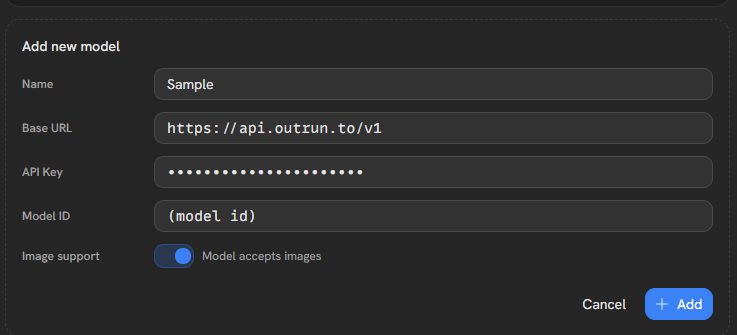
Screenshots for every step: Zo Computer setup guide.
Good to know
- After the 14-day trial, sites and services stop until you pick a plan. Files are kept.
- Custom models don't fall back to Zo's own, so keep some Outrun balance.
- Your model needs streaming and tool calls; the ones above have both.